AI Tools vs Underlying Models: Why Identical Prompts Produce Different Answers
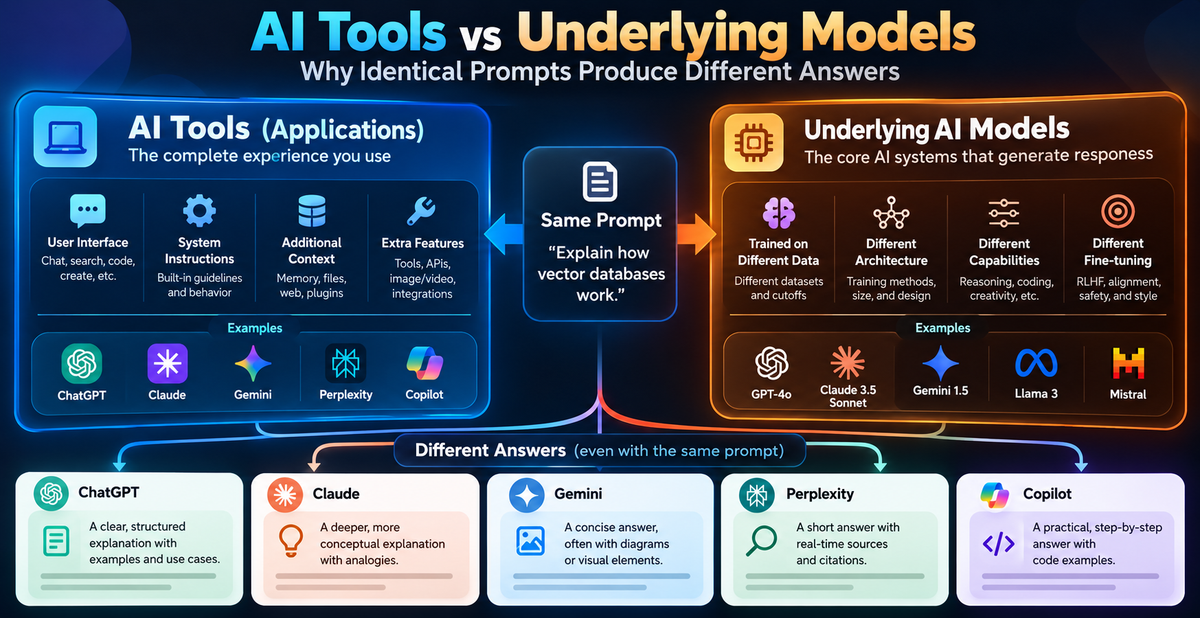
Two AI platforms can receive the same prompt and complete the same task while producing noticeably different answers. This happens because users interact with more than the underlying model. They also interact with a tool layer that controls context, retrieval, safety, formatting, and workflow behavior.
This distinction matters when researchers and professionals compare ChatGPT, Gemini, Claude, or other AI systems. A different result does not automatically show that one model is more capable. The difference may come from the application surrounding the model.
What Is An AI Model?
An AI model is a trained algorithm, often based on a neural network, that identifies patterns in data and generates predictions or content. Language models predict likely sequences of text. Image models generate visual content from text or other inputs. Specialized models may classify documents, extract information, or produce code.
Examples include:
- GPT-4o, GPT-4o-mini, and GPT-4.1 from OpenAI
- Claude 3.5 Sonnet from Anthropic
- Gemini 1.5 Pro and Gemini 2.5 Pro from Google DeepMind
- Stable Diffusion 3 for image generation
- o1 for reasoning-focused tasks
The model supplies the central generation capability. However, a model by itself does not define the complete user experience.
A standalone model does not have direct web access by default. It also does not automatically retain a useful memory of every past interaction, apply a product’s safety policy, or format an answer for a specific workflow.
What Is An AI Tool?
An AI tool is a user-facing application that connects one or more models with practical features. ChatGPT, Claude.ai, Gemini Advanced, Perplexity, Microsoft Copilot, and Jasper are examples of AI tools or platforms.
The tool layer may include:
- A chat or document interface
- System instructions
- Conversation memory
- Context selection and compression
- Web search or document retrieval
- Safety filters
- File and image processing
- Output templates and formatting rules
- Connections to other software
The application decides what information reaches the model and how the final response reaches the user. This means the same underlying model can behave differently in two products.
The Main Difference Between A Model And A Tool
The simplest distinction is functional:
| Component | Main role | Typical example |
|---|---|---|
| AI model | Generates predictions or content | GPT-4o or Gemini 2.5 Pro |
| AI tool | Delivers a complete workflow around a model | ChatGPT or Claude.ai |
| Retrieval system | Finds relevant outside information | Web search or a document index |
| Context manager | Selects, stores, or compresses messages | Conversation memory |
| Safety layer | Applies policy and risk controls | Refusal or content filtering |
The model is one part of the system. The tool determines how that model is used in a practical setting.
Evidence From A Practical Test
In experiment EXP-006, three identical prompts were tested across ChatGPT, Gemini Pro, and Claude. Each platform completed the required tasks, but the observed results were not identical.
The response patterns showed distinct tendencies:
- ChatGPT favored concise, direct recommendations.
- Gemini supplied more detailed and conditional guidance.
- Claude focused more strongly on conceptual clarity and implementation constraints.
These differences do not prove that one platform has greater general intelligence. They show that platform behavior includes more than model weights. System prompts, interface design, context handling, safety controls, and response formatting can influence the final answer.
A second test, EXP-002, can be interpreted in the same way when output length, structure, or instruction-following changes across platforms. The practical question is not only which model generated the text. It is which complete system produced the result under the conditions being tested.
How The Tool Layer Changes Responses
Context Compression
Long conversations create a technical limit. When a user refers to an instruction from many messages earlier, the tool may summarize or compress older content to keep the active context within limits.
If an instruction disappears from the effective context, the model may appear to have forgotten it. The underlying model may not be the main cause. The context manager may have reduced or rewritten the earlier messages before sending them to the model.
Retrieval-Augmented Generation
An AI tool can retrieve information from websites, uploaded files, company databases, or connected applications. It then provides that material as context for the model.
This process is called retrieval-augmented generation, or RAG. It can improve answers about current or private information, but results depend on search quality, source selection, indexing, and the model’s use of retrieved text.
A standalone model without retrieval receives none of that external evidence. Comparing it with a tool that performs web searches is not a like-for-like model comparison.
System Prompts And Safety Controls
Applications can send hidden or high-priority instructions with the user’s prompt. These instructions can define tone, response structure, tool use, refusal behavior, and formatting.
Safety controls may also block a request, alter its wording, or produce a limited answer. A refusal may therefore result from the platform’s policy layer rather than from the underlying model’s inability to reason about the topic.
Diagnosing A Model Problem Or A Tool Problem
A structured diagnosis helps separate these causes.
Repeat the prompt in a fresh conversation.
If the issue disappears, conversation history or context compression may be involved.Remove retrieval and connected tools.
If the answer changes, external context or search quality contributed to the result.Test the same model through another interface.
This can reveal whether system prompts, safety rules, or formatting controls affect the output.Use a fixed output format.
Ask for a defined word count, schema, or number of bullets. Compare whether formatting loss occurs consistently.Record model, date, settings, and tool features.
Model versions and platform behavior can change, so a repeatable test requires clear conditions.
Formatting loss, generic reasoning, forgotten instructions, and refusals each need separate analysis. Treating every difference as a model failure produces weak conclusions.
How To Compare AI Systems At Workflow Level
A useful evaluation measures the complete workflow rather than model intelligence alone. For example, a research team should test whether a platform can:
- Retrieve relevant sources
- Preserve important instructions across messages
- Handle uploaded documents
- Produce the required structure
- Cite evidence accurately
- Maintain consistent output over repeated trials
- Support review and correction
A short benchmark may show which system answers a single question well. A workflow-level test shows whether the platform supports the actual job.
Researchers should also compare equivalent settings. A tool with web access, memory, and document retrieval should be evaluated against another tool with similar features. Otherwise, the comparison mixes model capability with product capability.
Conclusion
AI models generate predictions and content, while AI tools organize the conditions under which generation occurs. The tool layer can manage context, retrieve information, apply safety controls, and shape formatting. These functions can change the final answer even when the underlying model is similar.
The evidence from EXP-006 shows that ChatGPT, Gemini Pro, and Claude completed the same tasks with different response styles. We should therefore evaluate the complete system at workflow level. Testing the actual process, inputs, retrieval settings, and output requirements provides more useful evidence than judging a model from one isolated response.
What Is The Difference Between An AI Tool And An AI Model?
An AI model is the trained system that generates predictions or content. An AI tool is the application that gives users access to a model and adds features such as memory, retrieval, safety controls, file handling, and formatting.
Can The Same Model Give Different Answers In Different Tools?
Yes. Different applications may use different system prompts, context managers, retrieval systems, safety rules, or output settings. These tool-level differences can change the final response.
Is A Model More Important Than The Tool?
Neither component can be judged separately for every use case. The model affects generation quality, while the tool determines how information reaches the model and how results are delivered. The relevant evidence depends on the workflow.
Why Does An AI Tool Forget Earlier Instructions?
A long conversation may exceed the active context available to the system. The tool can summarize or compress older messages, which may remove details that the model previously received.
Does An AI Model Have Web Access?
A standalone model does not have web access by default. An AI tool may connect the model to search, databases, or uploaded documents and provide retrieved information as context.
How Should Professionals Compare AI Platforms?
They should use identical prompts, equivalent settings, repeated trials, and realistic workflow tasks. They should record retrieval behavior, formatting accuracy, instruction retention, citations, and limitations instead of relying on one answer.